#include "frame_buffer.h"
void
frame_buffer_1(pFrame_Buffer& demo_frame_buffer)
{
const int wd = demo_frame_buffer.width_get(); const int ht = demo_frame_buffer.height_get(); demo_frame_buffer[ 123 ] = 456;
demo_frame_buffer[ 0 ] = -1; demo_frame_buffer[ 1 ] = -1; demo_frame_buffer[ wd-1 ] = -1; demo_frame_buffer[ wd ] = -1; demo_frame_buffer[ 2 * wd ] = -1; demo_frame_buffer[ (ht-1) * wd ] = -1; demo_frame_buffer[ wd-1 + (ht-1) * wd ] = -1; int x = 1, y = 1;
demo_frame_buffer[ x + y * wd ] = -1;
uint32_t color_red = 0xff0000;
for ( int y=0; y<ht; y++ )
for ( int x=0; x<wd; x++ )
demo_frame_buffer[ y * wd + x ] = 0x101010;
{
const int x = 47, y = 24;
demo_frame_buffer[ y * wd + x ] = color_red;
demo_frame_buffer[ y * wd + x - 1 ] = 0xff;
demo_frame_buffer[ y * wd + x + wd ] = 0xffffff;
}
for ( int y=0; y<ht; y++ )
demo_frame_buffer[ y * wd + y ] = color_red;
for ( int x=100; x<500; x++ )
{
demo_frame_buffer[ 100 * wd + x ] = 0xff;
demo_frame_buffer[ 500 * wd + x ] = 0xff00;
demo_frame_buffer[ x * wd + 100 ] = 0x8080ff;
demo_frame_buffer[ x * wd + 500 ] = 0xff00;
demo_frame_buffer[ 99 * wd + x ] = 0xff;
demo_frame_buffer[ 501 * wd + x ] = 0xff00;
demo_frame_buffer[ x * wd + 99 ] = 0x8080ff;
demo_frame_buffer[ x * wd + 501 ] = 0xff00;
}
}
int
main(int argc, char **argv)
{
pFrame_Buffer demo_frame_buffer(argc,argv);
demo_frame_buffer.show(frame_buffer_1);
return 0;
}
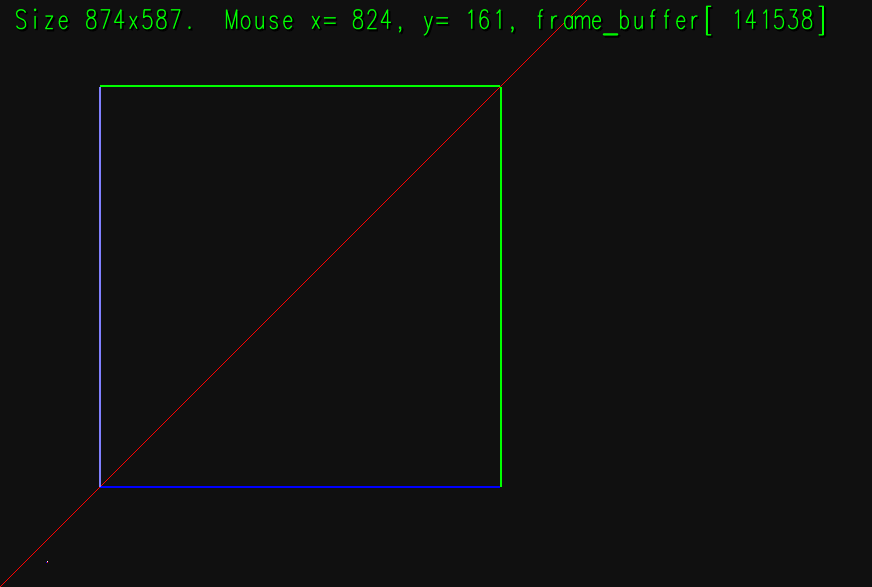 // Erase The Frame Buffer.
//
for ( int y=0; y<ht; y++ )
for ( int x=0; x<wd; x++ )
demo_frame_buffer[ y * wd + x ] = 0x101010; // Dark gray.
{
// Draw Some Pixels
//
const int x = 47, y = 24;
// Write a red pixel at coordinate x=47, y=24.
demo_frame_buffer[ y * wd + x ] = color_red;
// Write a blue pixel to the left of the red pixel, at x=46, y=24.
demo_frame_buffer[ y * wd + x - 1 ] = 0xff;
// Write a white pixel above the red pixel. (Note: 0,0 is lower left.)
demo_frame_buffer[ y * wd + x + wd ] = 0xffffff;
}
// Draw Diagonal Line
//
for ( int y=0; y<ht; y++ )
demo_frame_buffer[ y * wd + y ] = color_red;
// Draw a Square
//
for ( int x=100; x<500; x++ )
{
// Write frame buffer at location x=x, and y=100 (0 is bottom).
//
demo_frame_buffer[ 100 * wd + x ] = 0xff;
//
// wd is the width (in pixels) of the frame buffer.
demo_frame_buffer[ 500 * wd + x ] = 0xff00;
demo_frame_buffer[ x * wd + 100 ] = 0x8080ff;
demo_frame_buffer[ x * wd + 500 ] = 0xff00;
demo_frame_buffer[ 99 * wd + x ] = 0xff;
demo_frame_buffer[ 501 * wd + x ] = 0xff00;
demo_frame_buffer[ x * wd + 99 ] = 0x8080ff;
demo_frame_buffer[ x * wd + 501 ] = 0xff00;
}
}
int
main(int argc, char **argv)
{
pFrame_Buffer demo_frame_buffer(argc,argv);
demo_frame_buffer.show(frame_buffer_1);
return 0;
}
// Erase The Frame Buffer.
//
for ( int y=0; y<ht; y++ )
for ( int x=0; x<wd; x++ )
demo_frame_buffer[ y * wd + x ] = 0x101010; // Dark gray.
{
// Draw Some Pixels
//
const int x = 47, y = 24;
// Write a red pixel at coordinate x=47, y=24.
demo_frame_buffer[ y * wd + x ] = color_red;
// Write a blue pixel to the left of the red pixel, at x=46, y=24.
demo_frame_buffer[ y * wd + x - 1 ] = 0xff;
// Write a white pixel above the red pixel. (Note: 0,0 is lower left.)
demo_frame_buffer[ y * wd + x + wd ] = 0xffffff;
}
// Draw Diagonal Line
//
for ( int y=0; y<ht; y++ )
demo_frame_buffer[ y * wd + y ] = color_red;
// Draw a Square
//
for ( int x=100; x<500; x++ )
{
// Write frame buffer at location x=x, and y=100 (0 is bottom).
//
demo_frame_buffer[ 100 * wd + x ] = 0xff;
//
// wd is the width (in pixels) of the frame buffer.
demo_frame_buffer[ 500 * wd + x ] = 0xff00;
demo_frame_buffer[ x * wd + 100 ] = 0x8080ff;
demo_frame_buffer[ x * wd + 500 ] = 0xff00;
demo_frame_buffer[ 99 * wd + x ] = 0xff;
demo_frame_buffer[ 501 * wd + x ] = 0xff00;
demo_frame_buffer[ x * wd + 99 ] = 0x8080ff;
demo_frame_buffer[ x * wd + 501 ] = 0xff00;
}
}
int
main(int argc, char **argv)
{
pFrame_Buffer demo_frame_buffer(argc,argv);
demo_frame_buffer.show(frame_buffer_1);
return 0;
}